

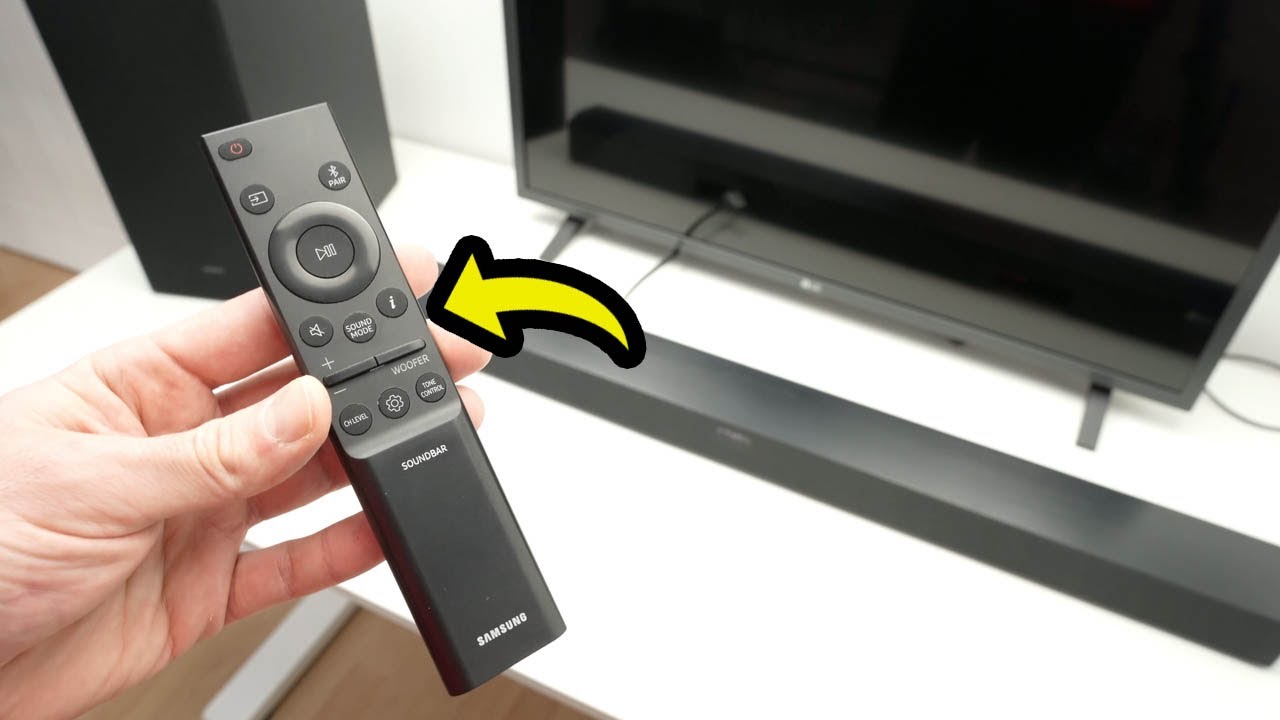
Here is step by step me explaining to you all the features of the Samsung Sound bar remote control has.
↓↓Amazon links↓↓
Same as the one used in this video:
►SAMSUNG HW-C450: https://amzn.to/3WwE8zx
If you want to upgrade to the next best samsung model:
►SAMSUNG HW-B550D 3.1 ch : https://amzn.to/4jxzRWc
Best top of the rage Samsung Soundbar:
►SAMSUNG HW-Q990C 11.1.4ch : https://amzn.to/3WwLwuC
► Replacement Remote for Samsung Sound Bar: https://amzn.to/4hw2Wzz
Great alternative from Bose:
►Bose New Smart Dolby Atmos Soundbar: https://amzn.to/4gbKoDQ
Another cheaper alternative from Yamaha
►Yamaha Audio SR-C20A: https://amzn.to/4hbP9yy
Amazing bluetooth boomboxes for your next party:
►200W Monster Rockin’ Roller Speaker: https://amzn.to/40GCfmf
►JBL Partybox 310: https://amzn.to/4hhBWno
The Amazon links above are affiliate, which means that I may get a small commission from them if you decide to buy something on their website. This is to support this channel 🙂
source


Thank you! I was struggling with the volume buttons. Up and down… bizarre
Thank you for this explanation! I wasn’t sure why my “woofer” button wasn’t working when I clicked it. Turns out, as you point out, you need to press up or down directionally, not directly into it.
Thank you very much 👍
Amazing video
This was the most helpful videos. Thank youuuu
Thanks Bro , Very clear
Excellent
This has at last sorted out a very frustrating remote many many thanks
Am I able to use night mode when playing music or is that just for tv/movies?
(When I pushed voice enhancement button while music is playing only "BT" shows)